FOR THE PEOPLE WHO RUN THE ACCOUNTS
You manage the client.
This watches their shelf.
Shelves of Babel is a share-of-shelf utility built for PPC managers, account managers, and freelancers. Your own account, your clients’ keywords, scraped daily: who owns the search results page, who moved overnight, and what changed it. Three keywords free forever; a whole client category for about the price of lunch.
No card. No seller account connection. No seat licenses. First data in minutes.
Monday, already answered
Share, movers, who is up, who is down. Every morning, on every keyword you track. You knew before the client asked.
Did the spend buy shelf?
Sponsored and organic, tracked separately. Your paid share, who owns the top of the page, and whether the ad pressure moved organic rank.
The budget conversation, armed
“We are losing shelf to Brand X on six keywords.” That closes more incremental spend than any slide about impressions.
Bad weeks, with context
Rank dipped. You already know why. Shelf churn, a competitor stacking listings, a price war. Context turns a blame conversation into a strategy conversation.
No client credentials
A shelf is just keywords. No Seller Central requests, no waiting on permissions. Track any market you manage, or one you are pitching next week.
Yours, and it travels
A personal account, not a seat on the agency license. New job, new clients, same tool, same history.
THIS IS THE ACTUAL PRODUCT
Screenshots from the live demo, not mockups. Everything below is one click away in the browsable demo account.
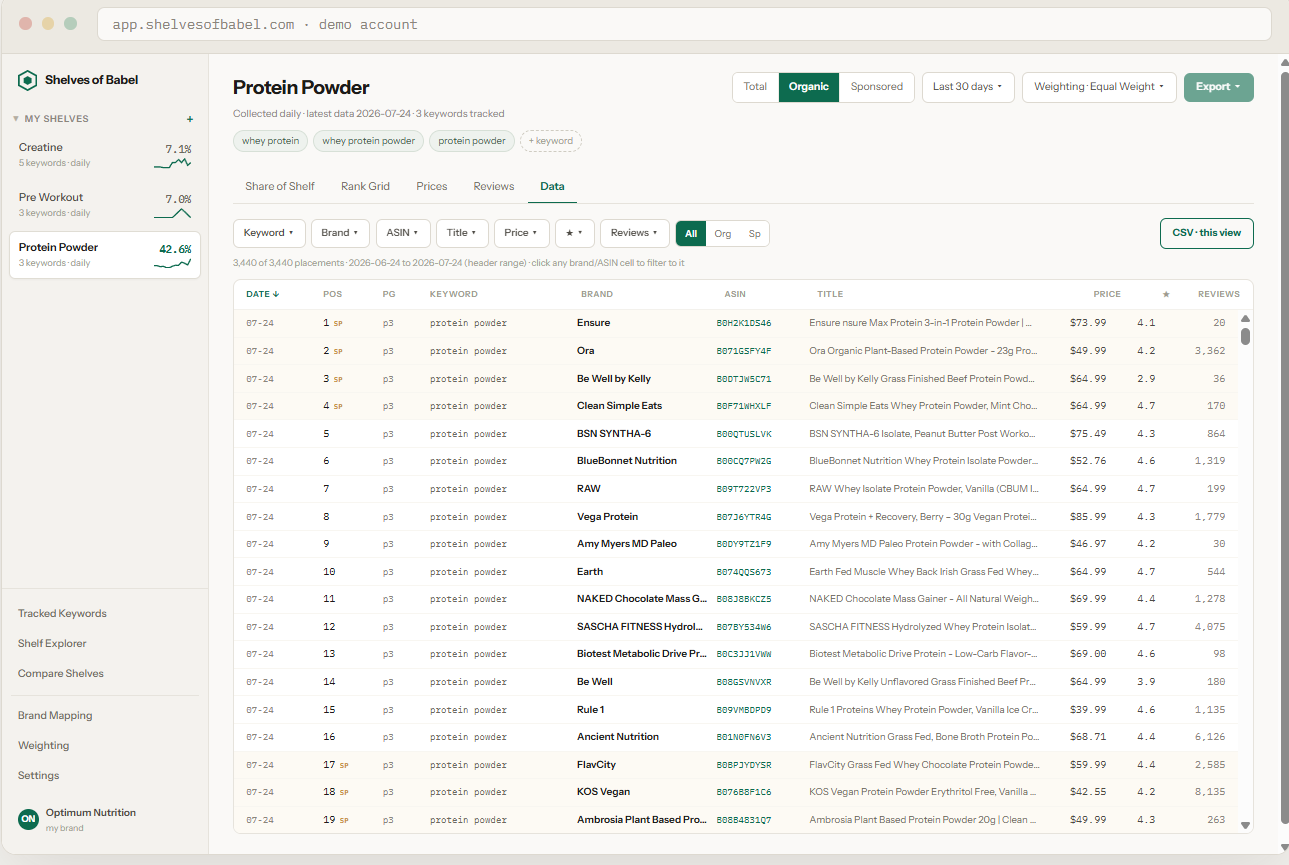
01 · THE RAW DATA
Every placement we scrape, yours to use however you want
Date, position, page, keyword, brand, ASIN, title, price, rating, reviews. Filter it, sort it, click any brand to pivot, export any view to CSV. Feed your own models, your own sheets, your own reporting. At a lot of agencies this table lives somewhere above your pay grade. Here it is the default.
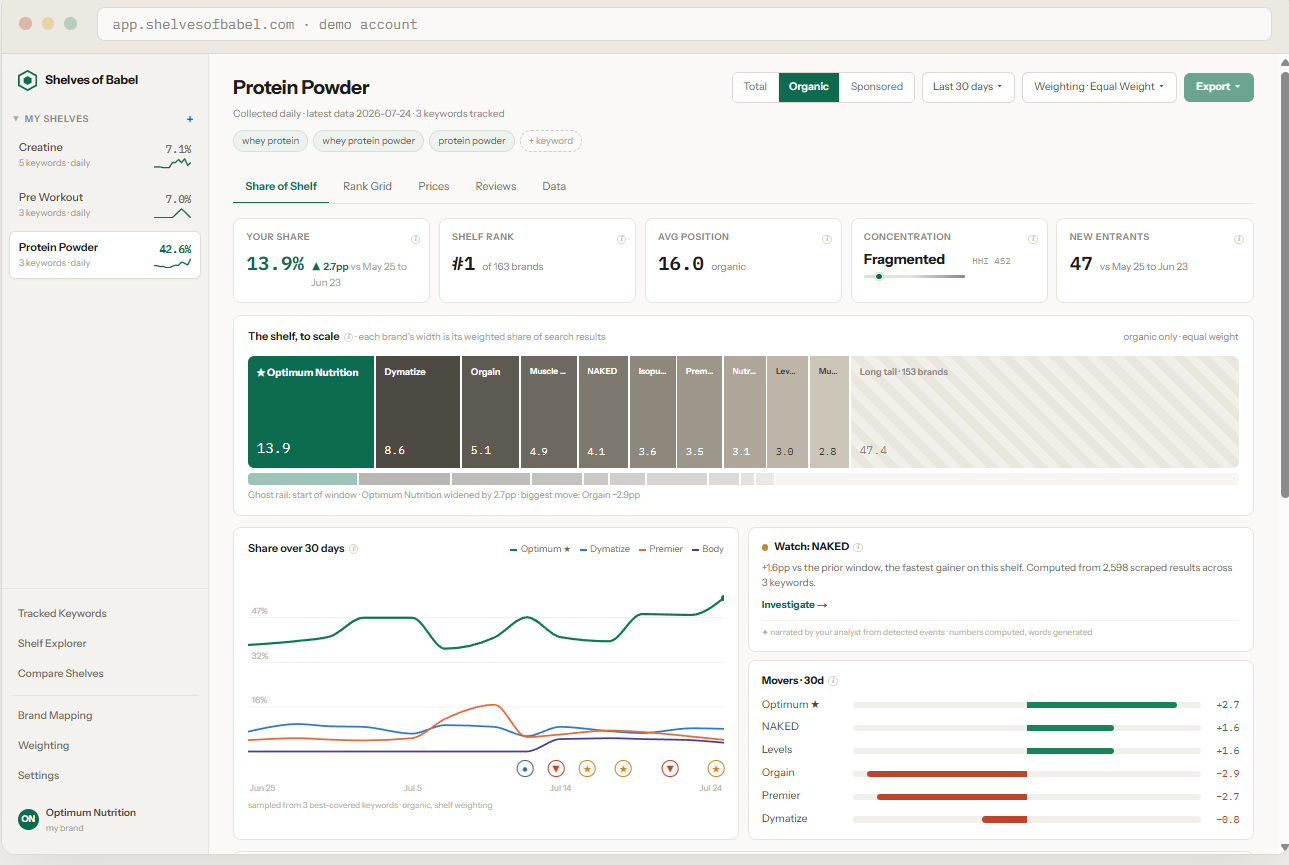
02 · THE VISUALS
Charts that go straight into the deck
The shelf drawn to scale, every brand's width its weighted share. A 30-day share trend with events pinned to the line. Movers, new entrants, concentration. Flip the weighting and the whole page recomputes. QBR-ready by default.
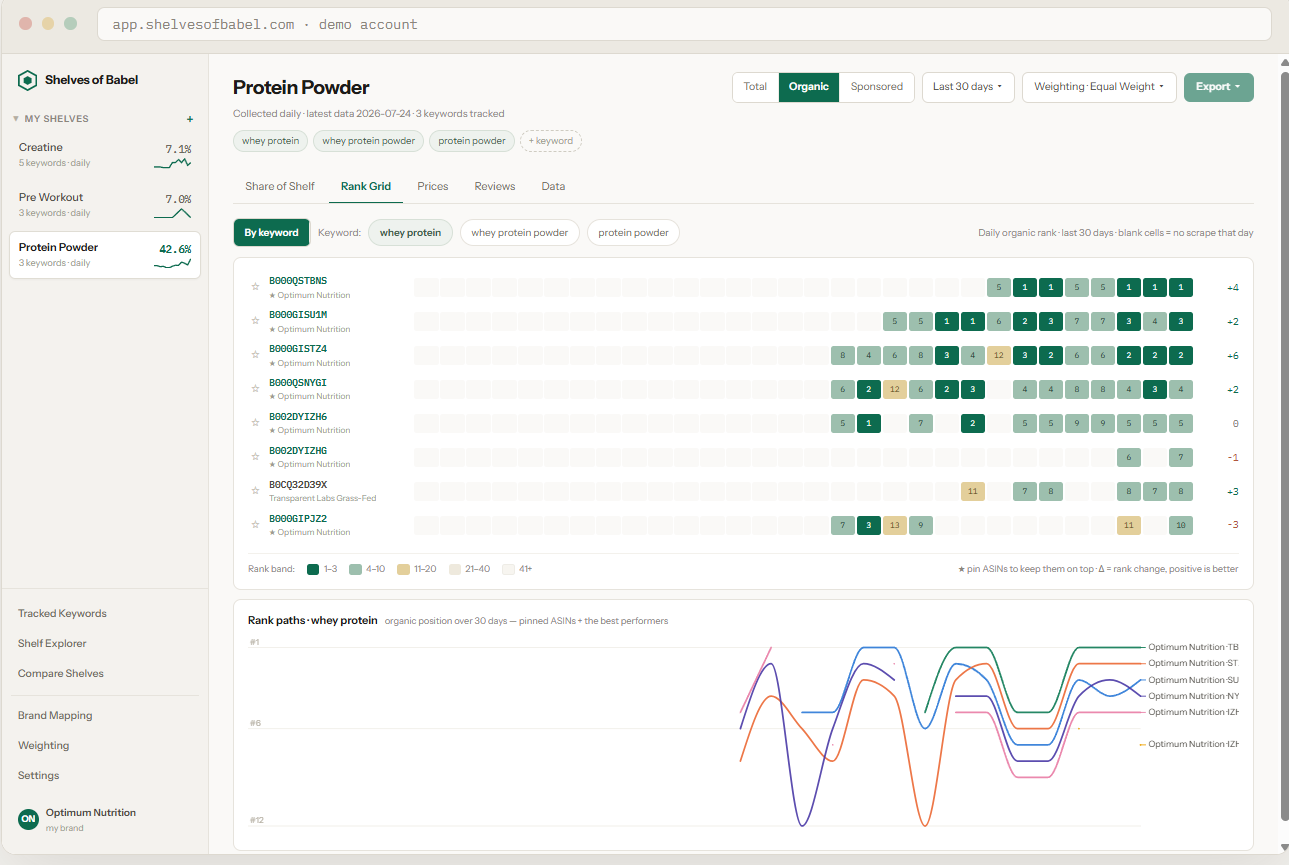
03 · THE DASHBOARDS
A dashboard per client, tabs per question
Each shelf in the sidebar is a client category with its own share number and sparkline. Inside: rank heatmaps per ASIN, rank paths over 30 days, price and review lenses, organic and sponsored split. Switching clients is one click.
THE MOMENTS THIS IS BUILT FOR
“
I knew my client had changed their main image before they told me.
“
A competitor cut price and took the top row. I flagged it before the brand noticed.
“
I walked into the QBR with the shelf trend for every keyword we bid on.
“
I stopped screenshotting search results at 6am.
“
The client asked what happened on Tuesday. I already had the answer open.
“
Rank dropped, and for once the first question was not what did you change. The whole shelf had churned overnight.
“
I tracked the category for two weeks before the pitch. We looked like we already had the account.
“
Three new listings hit page one overnight. My morning check caught all three.
“
Client wanted to know if the sale actually moved share. I had a before and after by lunch.
“
My boss asked where the data came from. Then he asked for a login.
“
The budget conversation took five minutes. I just showed them who was taking their shelf.
“
It costs less than my parking. Nobody had to approve it.
The whole price list fits in a sentence.
Three keywords tracked daily, free forever. After that, the meter: 45 cents per keyword per month for daily tracking. A typical client category of 20 to 30 keywords runs $10 to $14 a month. Seats, shelves, dashboards, weightings, and CSV exports are unlimited and free; you pay for collection, nothing else. Cancel whenever; your history stays.
Shelves of Babel scrapes Amazon search results on your schedule, resolves every product to a brand, and computes share of shelf weighted by how shoppers actually scan the page. Organic and sponsored tracked separately. Full methodology in the live demo.